


Introduction to Standard switch
- Sarbjeet Sehra
- Jul 26, 2021
- 3 min read


Virtual switch is the same like your physical switch. its allow the vSphere virtual machine talk to another machine as well as interface with physical network
There are two types of Switches under VMware vSphere
VMware vSphere Standard Switch (VSS)
VMware Distributed Switch (VDS)
Both the switches allow to control network traffics which included VMKernal migrations and Management traffic. Let's do deep drive on standard switch in this article.
Standard switch is default when you install any hypervisor(Esxi) When you install ESXi, the default management port group is attached to the first vSphere Standard Switch that is created by the installation – vSwitch0. No special license is needed for creating vSphere Standard Switches. The free version of ESXi allows you to freely use the VSS.

vSphere switch provides a connectivity to host and virtual machines. Physical NIC's on Physical host are connected to the uplink ports on the vSphere Standard Switch. Virtual machines running in vSphere use virtual adapters or vNIC's to connect to the port groups on the vSphere standard switch.
you can select & segregate network traffic against each individual port group which connected to host physical NIC's

Overview of connectivity with the vSphere Standard Switch
VSS work as a individual and you need to configure this on each and every host under vSphere environment hence configure VSS on multiple host is a tedious job. So, the bottom line with the vSphere Standard Switch is that it doesn’t scale very well from a management perspective.
You can configure, add, delete, and manage the vSphere Standard Switch under the context of the ESXi host settings. Navigate to the ESXi host > Configure > Networking > Virtual Switches to manage and configure your vSphere Stand Switches

Let’s take a look at the settings contained in the properties of a vSphere Standard Switch and see what configuration items are contained therein.

On this screen shot, Properties page contained in the properties of the vSphere Standard Switch, you can adjust the MTU Bytes of the VSS. This is where you can enable jumbo frames if needed.

Under the Security settings, you can enable Promiscuous mode, MAC address changes, and Forged transmits. These are especially common to enable if you are running nested virtualization using vSphere Standard Switches.
On this screenshot of the VSS properties, you can change the Traffic shaping configuration.

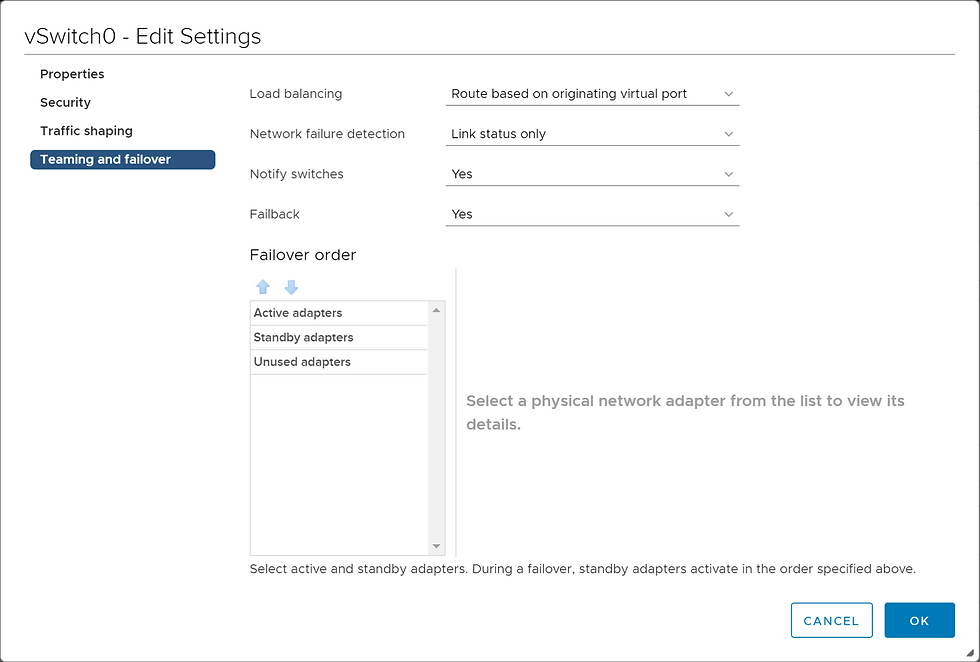
Lastly, the Teaming and failover settings provide control over load balancing configuration, network failure detection, failback, and the failover order of the network cards.
After adding the new switch, you will see it appear in the Configure > Networking > Virtual Switches section in the vSphere Client.

Difference between standard & distributed port.
Both types of VMware vSphere virtual switches allow vSphere administrators to control vSphere virtual machine traffic.
VSS is the vSphere Standard Switch which used to provide network connectivity to hosts and virtual machines and It’s a default Switch that in place post installation on ESXi (vSwitch0)
Standard switch works with only with one ESXi host
Other side VDS allows a single virtual switch to connect multiple Esxi hosts.

vSphere Distributed switch on a datacenter to handle the networking configuration of multiple hosts at a time from a central place.
You can create abstracted network devices called vSphere Standard Switches. You use standard switches to provide network connectivity to hosts and virtual machines. A standard switch can bridge traffic internally between virtual machines in the same VLAN and link to external networks.
To provide network connectivity to hosts and virtual machines, you connect the physical NICs of the hosts to uplink ports on the standard switch. Virtual machines have network adapters (vNICs) that you connect to port groups on the standard switch. Every port group can use one or more physical NICs to handle their network traffic.
If a port group does not have a physical NIC connected to it, virtual machines on the same port group can only communicate with each other but not with the external network.
A vSphere Standard Switch is very similar to a physical Ethernet switch. Virtual machine network adapters and physical NICs on the host use the logical ports on the switch as each adapter uses one port. Each logical port on the standard switch is a member of a single port group



Comments